Platform
 Solutions
 Owners
 Contractors
 Engineering/EPCM
 Professional Services
 Resources
 White Papers
 Case Studies
 Blog
Blog Videos
 Frequently Asked Questions
 Company
 About
AboutRead In 7 Minutes
AI In Software Development
With the release of new versions of AI software development tools by Anthropic and OpenAI, there’s a recent surge of excitement around AI enabling non-coders to quickly write software applications. This is also exciting for those of us in the tech industry who have been building complex applications for many years. For us, AI acts as a productivity tool that enables our developers and QA to offload low-level grunt work that can chew up time and effort that would otherwise be done manually.
1. Build Versus Buy
There is a great deal of hype around AI currently that is feeding the idea that organizations are now much more enabled to build their own applications that are customized exactly to their business. The thinking is that, rather than adopting off-the-shelf solutions, they can bypass all that and build something that meets their precise specifications. And do that in a matter of months, at a minimal cost.
This can be a very appealing idea, especially to those that are not deeply familiar with building complex software applications. If you are in that situation, and are debating the build-versus-buy options, following are some very important points to consider before jumping into something that could very likely be an expensive, time-consuming and frustrating journey.
1.1 Software is Easy, People Are Complicated
If your software application is going to be a business solution that will have users from one or more departments, you’ll need to first have a very clear idea as to what capability and features the users need in the system. This is by far the most challenging component of the entire software development lifecycle. This is because users have a very difficult time articulating what they actually need. If you interview enough of them, you’ll be able to gather a list of key features and business requirements to get started. There is a 100% chance, however, that this list will be both incomplete and unreliable. Again, this is because people are not very good at providing comprehensive descriptions of what the system needs to do. Not until they see it. But you need to start somewhere, so you use this list as a starting point.
1.1.1 Software Development Is Iterative
Even with the help of AI, the first version of the application will take 6 or more months to be ready to show your users. Software is complex. There is a lot going on beneath the surface that is required to ensure basic concepts like security, permissions, performance, data structures, governance, etc., are all in place and working correctly. It also needs to be heavily tested for data accuracy, integrity, usability, performance, and more.
Once you do sit down with users to show them this initial version, they will provide feedback. Then you’ll go back and make changes. You’ll add new features & enhancements and fix a lot of bugs. This next iteration will take another 3-6 months at minimum.
This iterative process, where you build, present, fix & enhance, present, and on and on, can go on for two to three years before you’re ready with a first live version that users are open to utilizing.
Business software development is very iterative because there are people involved. Every time you put something in front of them, they’ll point out all the things that are missing or wrong and send you back to the next development cycle.
Learn More About 4castplus Software
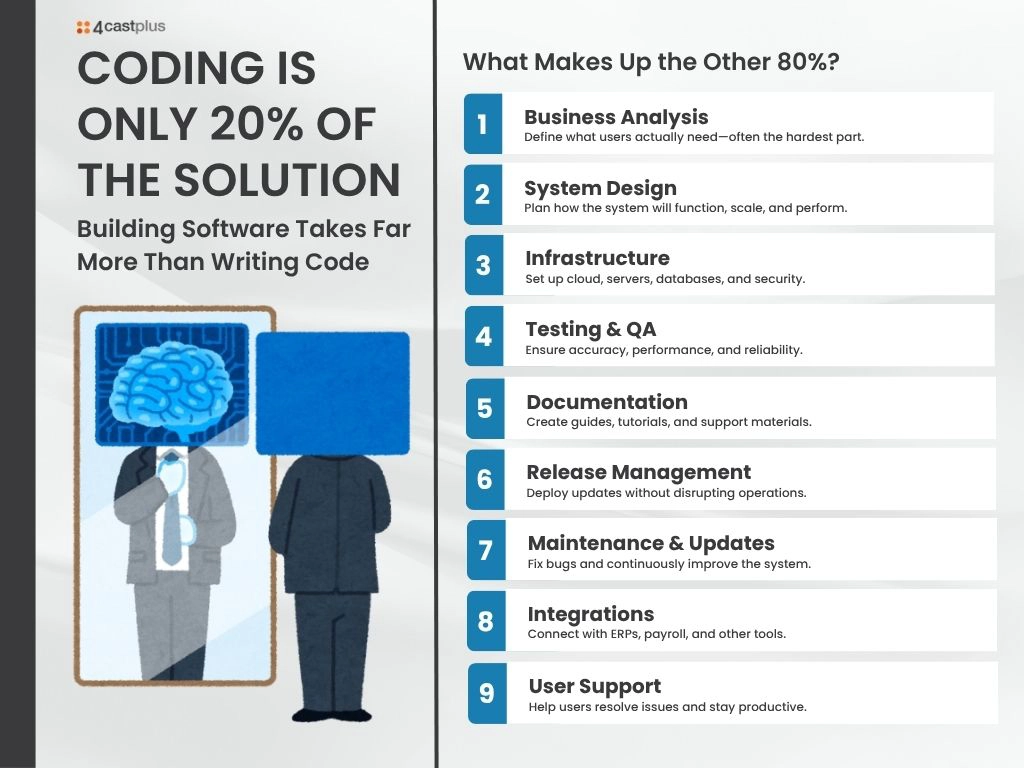
1.1.2 Coding Is Only 20% Of The Solution
What should be clear by now, is that the actual coding part only amounts to about one-fifth of the total effort to build the solution. You also need to factor in many other considerations for designing, building, testing, releasing, deploying, maintaining and supporting the system:
- Business analysis – understanding the requirements of users
- System design. What is the system going to look like?
- Infrastructure. Where is the system hosted? Is it cloud? Is it on a mobile app? Both? Do you have the servers with the database and security to host it?
- Testing. Your QA team needs to run regression tests to ensure business and financial accuracy.
- Technical documentation, tutorials and help files.
- Release management. When you ship a new version, you need to be sure it won’t break things and cause disruptions.
- Updates and maintenance patches. What happens when users come across bugs that need to be urgently fixed.
- Integrations. Does the system need to be fed with data from other systems? Or vice versa? What happens with integrations fail?
- Support. How do you handle users that run into issues
1.2 AI Doesn’t Know What You Want – The AI Alignment Problem
AI is very good at solving well-known problems. If you’re going to build a solution that’s unique to your business, AI won’t have anything in its model to base its designs on. This is often referenced within the overall “AI Alignment Problem”. This essentially means that AI doesn’t know what you want. It doesn’t know your values, objectives, desired outcomes, or your user base – or really anything about your business. AI will make guesses. And it will fill gaps with assumptions. Assumptions that can be wildly inaccurate.
What we’ve discovered is that AI can produce very buggy and incorrect code.
2. AI Is A Productivity Tool
AI agents are good at preparing meetings, completing tasks, or Agentic AI working towards stated goals – as long as the parameters and outcomes are defined. When it comes to coding, AI struggles with big picture thinking, so it’s best thought of as being able to perform distinct tasks. Such as, “Check this section of code for potential bugs and performance improvements.” Even with tasks like that, it can produce mixed results. Avoid using AI for tasks that require critical thinking, judgement or imagination.
When it comes to developing complex software applications – such as enterprise solutions – AI works primarily as a productivity tool. It can make a software developer or QA about 15-20% more productive.
Learn More
While AI can accelerate parts of software development, it doesn’t replace the years of iteration, domain expertise, and real-world testing required to build a reliable project controls system. That’s where 4castplus comes in. Purpose-built for complex capital projects, 4castplus delivers fully integrated cost tracking, forecasting, procurement, and reporting—without the risk, time, and uncertainty of building your own solution.
Instead of managing fragmented tools or investing in a long development cycle, you get a proven platform designed by industry experts, continuously refined based on real project needs. If you’re exploring whether to build or buy, see how 4castplus gives you the control, visibility, and speed to value you need—right out of the box.