Platform
 Solutions
 Owners
 Contractors
 Engineering/EPCM
 Professional Services
 Resources
 White Papers
 Case Studies
 Blog
Blog Videos
 Frequently Asked Questions
 Company
 About
AboutRead In 5 Minutes
A Better Way To Manage Procurement
The 4castplus Vendor Portal is a convenient and cost-effective tool to streamline procurement processes and significantly increase procurement productivity. It is a secure method to facilitate communication and document exchange between buyers and suppliers during bidding and also for issuance of purchase orders.

Vendor Portal For RFQ Bid Management
The 4castplus Vendor Portal eliminates the messiness of using emails and phone calls and dropbox solutions for bid management. It takes away a significant amount of low-level menial tasks in coordinating all the details, dates, documents, etc. It helps organizations apply standards and consistency and enables transparency & rich reporting.
When inviting multiple vendors – whether they’re suppliers or subcontractors – to submit bids or proposals, the Vendor Portal provides a platform to manage the full bidding process. The Vendor Portal smooths the bidding process for both the buyer and the vendors.
For The Buyers
In 4castplus, buyers first set up the RFQ by establishing the contract terms, then add the list of items they want suppliers to bid on. This item list could be various materials, equipment, services or a combination of all of them. This list can be drawn from the 4castplus item database or imported from an external bill of materials.
They will also attach any documents to the RFQ for technical specifications, drawings, etc.
Next, the buyers will define the evaluation criteria for grading and comparing vendors in the final competitive bid analysis, once the bid is closed and all proposals are received.
Finally, the buyers will select the bidders from the master list of vendors from the 4castplus vendor database. Once the list of bidders is determined, the buyer will “Issue” the RFQ to the selected bidders. 4castplus will then send an email to the vendor contact informing them that they have been selected to submit a bid. That email will contain a link to take them to the Vendor Portal where they can download the information, interact with the buyer, and submit their proposal.
Once the bid is closed, all the information collected from the vendors through the Vendor Portal is nicely laid-out for the buyer team to perform a bid analysis and ultimately award the PO to the winning bidder.
The 4castplus Vendor Portal enables buyers to eliminate all the manual organization of bids, pricing, communication and documents – and provides a unified and controlled platform to easily coordinate all the details of multiple bids.
For The Vendors
When the vendor contact receives the invitation to bid, they will log in to the Vendor Portal and review the information provided by the buyer. They have the option to select “Will Bid” or “Decline Bid” within the vendor portal informing the buyer of their choice. They have a time limit to make this selection.
Should they choose to submit a bid, they will then be able to do the following directly in the Vendor Portal:
- Upload their pricing
- Provide any options, alternatives, discounts, etc.
- Upload any documents such as drawings, specifications, photos, etc.
- Upload their proposal documents
- Engage with the buyer in the “Discussion Stream” chat forum
- Submit their bid
During this bidding process, the buyer will be notified of any activity by any vendor in the portal. The buyer can send messages, update documents or items throughout the bidding cycle. Vendors will also be notified via email of any changes or updates. Vendors have no visibility into other vendors, as it is a private and secure portal.
Not all vendors may be open to using the vendor portal, so the buyer can deselect any vendors that want to opt-out of using the portal.
Vendor Portal For Purchase Order Management
Whether there is an initial bidding process or the buyer elects to go straight to purchase order, they can take advantage of the Vendor Portal to issue purchase orders or subcontracts. This considerably reduces the manual effort in managing the back and forth between buyer and vendor.
For The Buyers
When the buyer is creating the purchase order, they have the option to select whether or not to leverage the Vendor Portal to manage the communication and document exchange with the supplier or subcontractor.
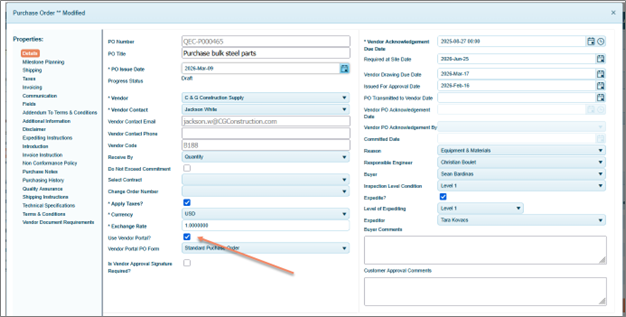
Once the PO is ready to issue, the buyer will “Commit” the PO which will route it through a multi-stage approval workflow, after which it will be fully committed. This will trigger a notification to the vendor contact that they have been awarded the PO. That notification will contain a link for the vendor contact to log into the vendor portal to review the PO details.
For The Vendors
When managing one or multiple purchase orders, the vendor can leverage the portal as a secure and convenient platform to coordinate all the communication, documents, status, reporting, etc. to streamline their experience and ensure transparency.
Within the portal, the vendor will be able to review all the PO details, along with the following:
- Acknowledge the PO
- E-Sign the PO
- Upload any further documents (submittals)
- Engage in ongoing communication with the buyer team
Every act taken by the vendor will trigger notifications to the buyer throughout the life of the PO.
Learn More
The 4castplus Vendor Portal is designed to simplify and standardize procurement workflows for project-driven organizations. From managing RFQ bid invitations to coordinating vendor proposals and issuing purchase orders, the portal provides a secure and centralized platform for collaboration between buyers and suppliers. By reducing manual communication, organizing documents and pricing in one place, and providing clear visibility throughout the bidding process, project teams can improve efficiency, transparency, and decision-making across every stage of procurement.
Ready to streamline your procurement process? Contact the 4castplus team to learn more or schedule a demo.