Platform
 Solutions
 Owners
 Contractors
 Engineering/EPCM
 Professional Services
 Resources
 White Papers
 Case Studies
 Blog
Blog Videos
 Frequently Asked Questions
 Company
 About
AboutRead In 4 Minutes
Revise Purchase Orders
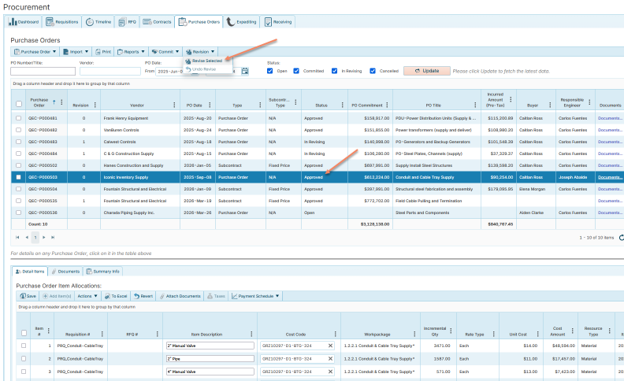
Revising a purchase order is a lot like applying a change order to a purchase order. It’s a managed process for modifying a committed purchase order – because once a purchase order has been committed, its values can’t be changed, as it is a legally binding document. A “Revision”, however, enables the user to initiate a formal and controlled change to the purchase order (or subcontract), which opens the PO’s otherwise locked data fields for edit. After which, it can then be routed for approval to be committed again.
Once the user moves to revise the PO, the status of the PO changes from “Approved” to “In Revising”. See the screenshot below.
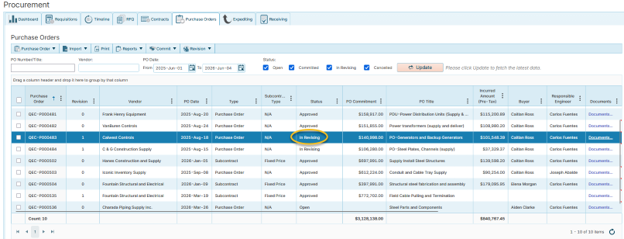
While the PO is in revising, specific fields of the PO and its line items can be edited. Some examples of the kinds of changes that can be made are as follows:
- PO subsections (including T&Cs and other legal sections)
- PO dates and other details
- Line-item quantity (see more on this below under ‘controlled changes’)
- Line-item unit rate and/or rate type
- Line-item dates, codes, taxes
- Adding new line items
- Deleting line items
Controlled Changes
The system will apply controls on what can be modified and by how much. A good example of this is when editing an item’s quantity. Let’s say, for example, that a line item’s quantity was originally committed on a PO at 100 units. Over time, 80 units have been received, leaving 20 remaining. If you were to then revise that PO, the system would not allow you to reduce that quantity to below 80 units. Since those 80 units have already been received.
Revision History
4castplus keeps close track of all the changes that occurred in each revision. Since there’s no limit to the number of revisions, having a clear historical trace of what happened at each revision is important. 4castplus therefore provides multiple tools to ensure visibility into that.
- Revision History Report. A detailed report showing the base and all revisions of a PO
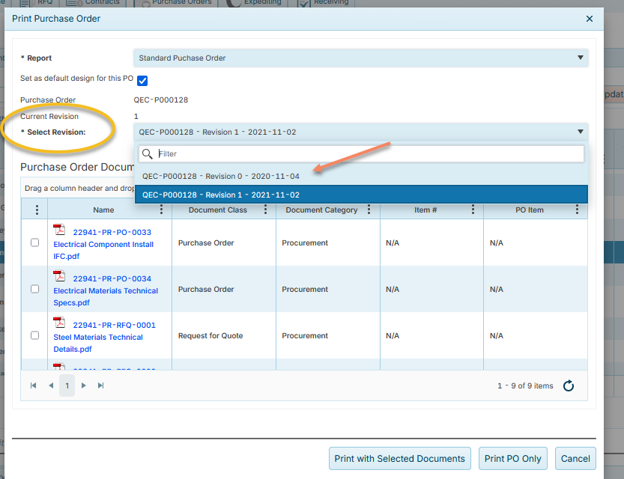
- Print to a Revision. When printing a PO, you can select which revision to print (or just print the latest, including all revisions)
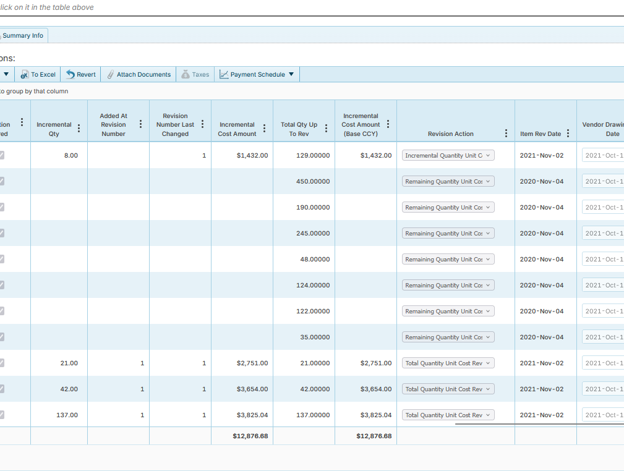
There are also numerous revision metrics and data fields the system shows in the interface. For example, in the screenshot below, you’ll see 8 columns related to revisions made to certain items.
Route For Approval
Once a PO has been revised, you can then route it through an approval workflow to re-commit the PO. This will move the PO from In-Revising to Approved and make the PO available again to receiving.
Initiating A Revision
Learn More
Let us know if you’d like to learn more about purchase orders or anything else in 4castplus. We’re happy to help.