Platform
 Solutions
 Owners
 Contractors
 Engineering/EPCM
 Professional Services
 Resources
 White Papers
 Case Studies
 Blog
Blog Videos
 Frequently Asked Questions
 Company
 About
AboutRead In 11 Minutes
Why Labor Time Drives Project Cost Control
On construction projects, jobsite costs (labor, equipment, and materials) represent the majority of project expenses, with labor typically being the single largest component. This implies that getting accurate project costs depend considerably on capturing accurate labor costs from the jobsite. Every hour not captured, or any misallocation or delay, will result in a misleading picture of a project’s progress, real-time cost, and status.
Yet too often, timesheet systems are treated as a compliance tool for purposes of payroll and regulatory requirements rather than as a strategic job costing solution. Contractors that do self-performed work will typically upgrade from spreadsheets and paper timecards to some digital field capture solution as their first toe in the door of construction software applications. Even if they’re still using spreadsheets to manage the project, timesheets are generally adopted as a reaction to HR and compliance. Those labor hours, however, don’t automatically make their way back into the project manager’s spreadsheets or system after they’ve been uploaded to payroll. What might happen, is that the hours will be sent from payroll to their accounting system, and then the data is dumped out from there to a report that’s sent to the project manager every week or two, to then be rekeyed into the project manager’s spreadsheet or PMIS.
Time To Insights
Not only is a process like that filled with errors, inefficiencies, delays and financial risk, it’s also very costly and drives down margins. But the biggest drawback to using a single-purpose field app for tracking labor, is that it’s not directly feeding the project management system in real-time. What I’m getting at, is that timesheets are not just useful for time – they’re capable of so much more. They’re a key indicator of cost, progress, productivity, revenue, and profit. On top of that, they provide project managers with real-time insights into potential issues that need attention. The speed and accuracy of your insights depend directly on how you capture, process, and compare timesheet data. We’re calling this “Time to Insights” to reflect the risk that is caused when there are delays in getting information to those making decisions.
The thing that may not be well understood is that if you’re already getting your field staff to submit their hours, most of your work is already done. What you’re missing is that there’s so much more you can do with those same hours than just payroll; that comes at no extra effort. It’s only a matter of taking the same information and making use of it for many valuable purposes.
Learn More About Jobsite Cost Tracking
Is Your Timesheet System Optimized for Time to Insights?
Not making full use of the hours you’re already collecting is like having a large sum of money in a no-interest bank account. That money is simply not working for you.
5 Questions Every Construction Leader Should Ask
To know if you’re missing opportunities to make data-driven decisions that could prevent cost overruns, schedule delays, and margin erosion, here are five key questions to evaluate whether your timesheet system is truly set up to deliver faster, high-quality time to insights.
1. How Close To The Jobsite Is Data Being Captured?
The closer your timesheet system is to the work front, the faster your insights. If superintendents, lead hands, or field staff can enter progress and time directly from the field, you’re getting high-quality data in near real time. If data is far removed from the site, accuracy suffers, and dashboards show data that’s days (or weeks) behind reality.
It’s not just about entry, of course. It’s also about visibility into productivity. How close to the jobsite is performance reflected? Can your foremen and superintendents quickly visualize their crew’s performance at the end of each day? Do they have dashboards that are immediately available after entering timesheets? Dashboards that show up-to-the-minute productivity metrics reflecting how well you performed that very day – or as a comparison over the past weeks. If not, you’re losing valuable opportunities for early course-correction.
2. Is Your Timesheet System Integrated With Your Project Controls System?
A standalone timesheet app may capture hours, but how long does it take for those hours to reflect on your project dashboard? Additionally, are those hours just hours, or are they also used to calculate project cost? Or, if applicable, project revenue? If you don’t have rate sheets built into your system that enable automatic and real-time calculations of cost incurred and revenue earned from those hours, then you definitely don’t have key project insights for decision making.
Integration with your project management information system (PMIS) eliminates manual re-entry and ensures costs and hours flow seamlessly into earned value, cost reports, and forecasts. Timesheets should be natively integrated so that you can quickly understand project performance at the end of each day, not weeks later when reports are finally consolidated.
3. Can You Easily Analyze Labor Productivity Metrics In Real-Time?
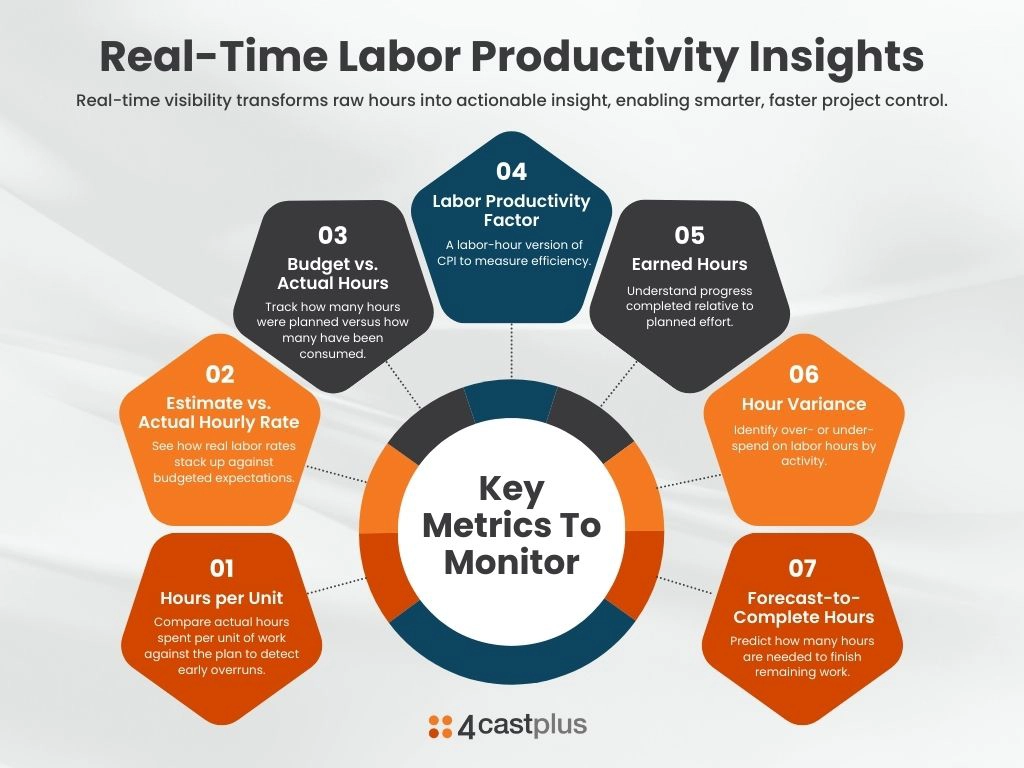
Labor productivity is a critical metric to stay on top of throughout a project. It provides continuous visibility into performance indicators such as:
- Hours per unit. How many hours has it taken on average to complete a measurable unit of work. And compare that against the number of hours that were planned. This is a great early indicator of potential cost and schedule overruns. (units-per-hour is also a key metric).
- Estimate versus actual hourly rate. What were the estimated hourly rates for each discipline, compared with the actual hourly rate for the same discipline.
- Budget versus Actual Hours. What was budgeted, in terms of planned hours, versus what has actually been consumed for each workpackage or code on a project.
- Labor Productivity Factor. This is similar to CPI but used on labor hours.
- Earned Hours. Similar to Earned Value.
- Hours Variance. How much over or under an activity is on the planned versus burned hours.
- Forecast to complete hours. How many hours are required to complete a task.
Capturing hours is only part of the picture. Insight comes from context:
- Are hours coded against the right cost codes and activities on the project?
- Can you align progress with the integrated budget and schedule?
- How easily can you see whether today’s work matched what was planned for this period?
4. Are Labor Hours Billable?
If any of your projects are billed out on a time & materials or cost-plus contract model, then labor hours will result in recognized revenue on the project. If the hours collected are only being routed to payroll, then those hours will have to be subsequently input into the finance system to be processed for revenue recognition and billing. After that, there may be an export from finance that can be input into the PMIS to report on revenue and project margin. This roundabout path of getting revenue to show up for the project manager to analyze profit metrics, can take weeks to appear. Meanwhile, the project’s profitability may have taken a nosedive without anyone knowing. Profitability is one of the critical metrics that should be available in real-time.
Billable projects, therefore, should have a direct and live connection to the revenue that’s generated on them. Which means that billable hours should be reflected daily. It is the responsibility of the project manager to defend and uphold project margins.
5. How Comprehensive & Usable Is Your System For Field Staff?
The best timesheet system is the one that satisfies two major objectives:
- Does it provide a comprehensive suite of features
- Is it easy to use for your field and office staff
Key Timesheet Features for Construction Labor Tracking
Some baseline features that are a must-have:
- Track projects to a specific code or activity
- Allow a single user – like a field admin – to enter time for multiple people
- Enforce data integrity rules: such as min/max hours per day, mandatory comments, dropdown selections, etc.
- Enable multiple rate structures. For overtime, union rates, etc.
- Time should be calculated against cost and billing rates to recognize cost and, where applicable, billable on the project at the appropriate code
- Allow a person to track their time against multiple disciplines
- Provide for entering physical progress
- Hours, cost, billable, progress, etc. should update the project in real time
Key Timesheet Usability Factors to Consider
The best timesheet is one that people will actually use. Timesheet capture should be:
- Simple and intuitive for foremen, admin, and crews
- Mobile-ready for on-site use
- Designed to minimize errors and missing data with point of entry data integrity checks and seamless approval workflows with the capability for downstream adjustments.
- The system should have smart features the reduce clicks and re-entry
This is where end-user and field-focused technology makes the difference. If your system isn’t designed with the people on the front lines in mind, adoption will lag ……. and so will your insights and ability to manage project performance.
The Bottom Line: Time to Insights Matters
In construction, labor decisions made today shape project cost and schedule outcomes. The faster you move from time entry to actionable insight, the better equipped you are to control costs, optimize productivity, and deliver projects on budget and schedule.
At 4castplus, we help construction leaders bridge the gap between timesheet capture and project intelligence. With an integrated platform for jobsite progress, time, cost management, revenue, user friendly data integrity checks all designed around a mobile friendly interface, you’ll move from raw data to meaningful insights in record time.
Learn More
Want to see how 4castplus turns timesheet data into real project insight? By capturing labor hours directly from the jobsite and linking them in real time to cost codes, budgets, and progress, 4castplus gives teams immediate visibility into labor cost, productivity, and project performance. Identify issues earlier, reduce manual handoffs, and use the hours you’re already collecting to protect margins and keep projects on track.