Platform
 Solutions
 Owners
 Contractors
 Engineering/EPCM
 Professional Services
 Resources
 White Papers
 Case Studies
 Blog
Blog Videos
 Frequently Asked Questions
 Company
 About
AboutRead In 3 Minutes
Configure Multi-Stage Approval Workflows
There are a variety of important documents or items in a project that need to be routed for oversight and approval before they can be fully committed and completed. 4castplus provides a comprehensive Approval Workflow engine that enables users to configure multi-stage approvals for the following approval types:
- Purchase Orders
- Purchase Requisitions
- Change Orders
- Timesheets
- Documents
- Vendor Invoices
- Jobsite Field Tracking
- Customer Invoices
Approval workflows have a number of features and parameters that are worth understanding in order to get the most out of them.
Workflows & Stages
Approvals are configured into Workflows and Stages. Each workflow can be setup to have multiple stages. Each approval type can have multiple workflows. Using purchase orders as an example (all approval types work the same), you may require a unique approval process for various different types of purchase orders. Working on a government contract may require a different set of rules for approving purchases than a private sector contract. Or, when approving a simple PO for consumables versus a more complex purchase for major fabrication long-lead PO. Each use-case can have its own unique approval workflow. The workflow, therefore, represents the approval scenario (or use-case) and the stages define the approval sections within the workflow.
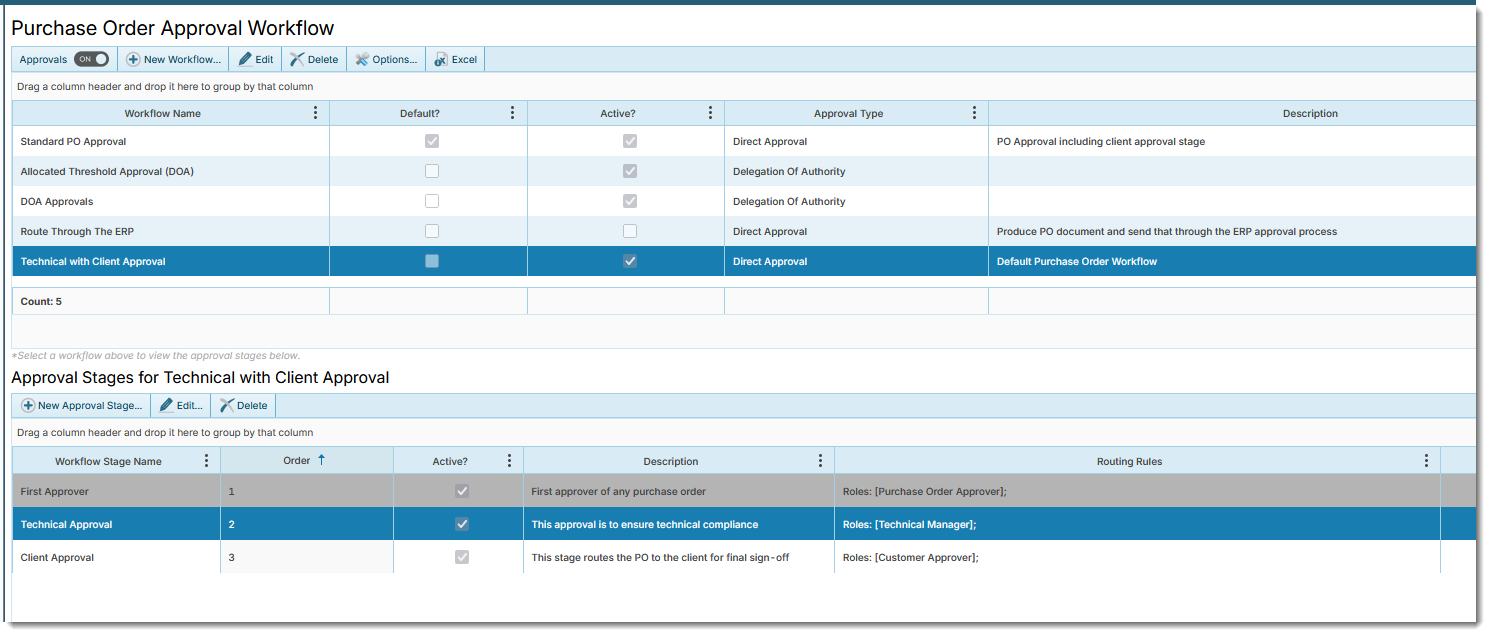
Looking at the screenshot below, the screen is split into the workflows on the top, and the stages of the selected workflow on the bottom half of the screen.
Stages
The selected workflow in the screenshot above has three stages. Each stage can be configured with the Routing Rules for which project Role that stage is going to be sent to for approval. The second stage, for example, is configured to be sent to the Technical Manager of the associated project.
You can setup the stage to have multiple roles. Each of the individuals assigned into the role on the project will have to approve the stage before it can move to the next stage. Stages are completed in sequence according to the Order column.
Delegation of Authority
Workflows can be configured as either:
- Direct
- Delegation of Authority (DOA)
In a direct approval, each of the roles assigned to the stage will be required to approve the stage.
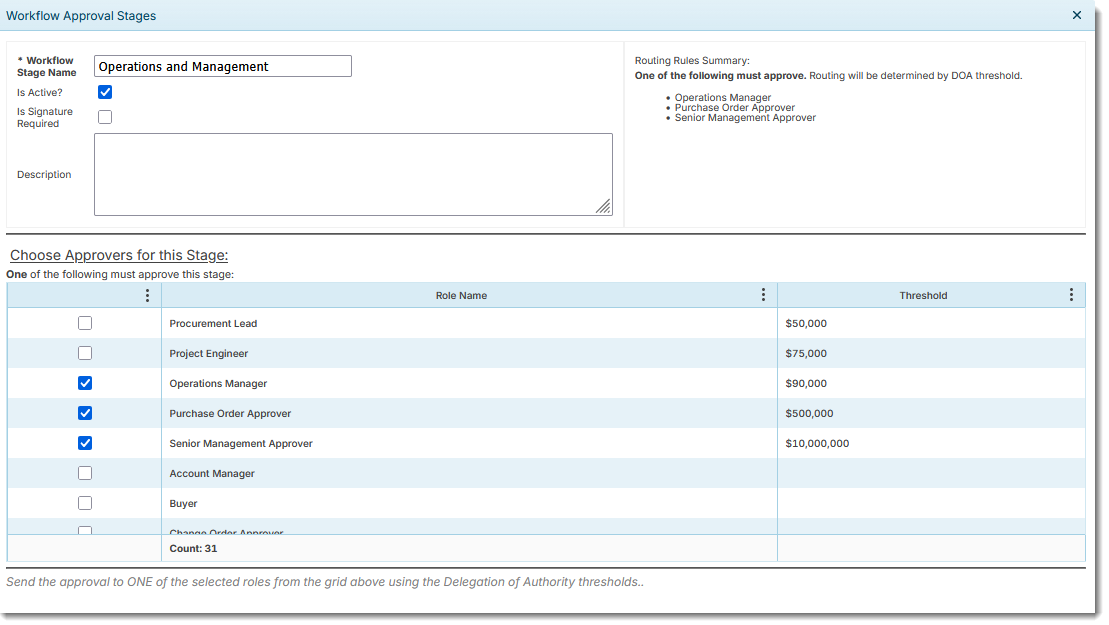
DOA approvals use configured approval thresholds to determine the applicable role to approve the stage. In a DOA approval, only one of the roles will be required to approve. The system will evaluate this based on the value of the purchase order against the approval threshold of the roles.
In the screenshot below, there are three roles selected for this stage. Each role has a defined threshold, which the system will use in its routing logic.
Learn More
Let us know if you’d like to learn more about approval workflows or anything else in 4castplus. We’re happy to help.